Microsoft 365 Security Audit
See exactly how secure your Microsoft 365 really is – through the eyes of an ethical hacker.
What this audit actually does
This isn’t a generic “health check” or a bit of light box-ticking.
Your Microsoft 365 Security Audit is a focused review of how your M365 tenant is set up today – led by an ethical hacker, using professional, state-of-the-art security tools to uncover the gaps attackers love.
You’ll walk away with:
A straightforward security posture score for Microsoft 365
- ✓ Clear view of exposures & strengths
- ✓ Prioritised fixes - know what's urgent
- ✓ Plain English for leadership & IT
On this page we answer the key questions you’d naturally ask before booking – what it is, what you get, how it works, and whether it’s right for you.
What I look at inside your Microsoft 365
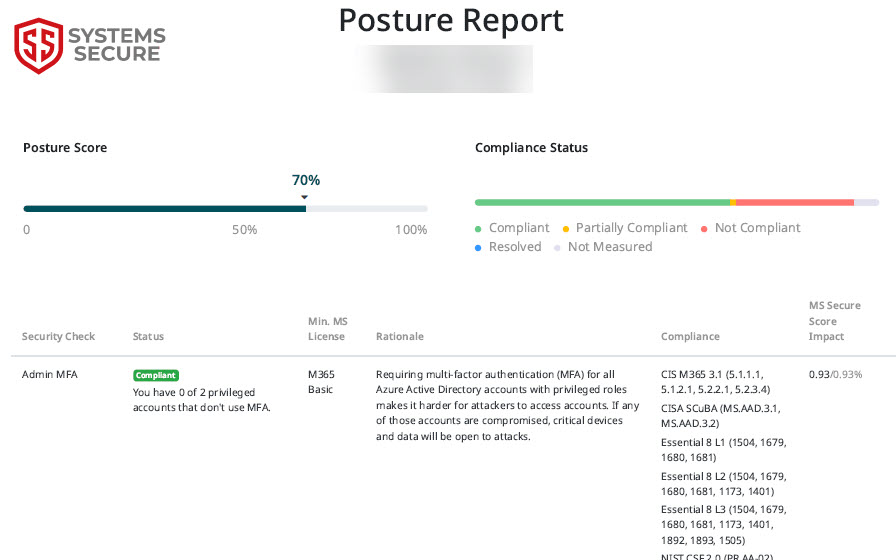
Your Microsoft 365 security posture score comes from a full set of checks that run across your tenant – not just a quick look at MFA and a couple of switches.
Using my ethical hacking mindset and professional tools, I review how Microsoft 365 is configured and used, and score you across key areas like these:
What you get from your Microsoft 365 Security Assessment
A comprehensive security review that actually makes sense to business owners – not just another technical report that collects dust.
Security Posture Summary
A business-friendly overview that actually makes sense. No jargon, no acronyms, just clear insights about your Microsoft 365 security.
- Your overall security score in plain English
- Key risks explained in business terms
- How you compare to sensible security baselines
- What's working well and what needs attention
Perfect for board presentations or compliance documentation.
Prioritised Risk List
Not everything matters equally. I highlight the most important issues first – the ones that meaningfully reduce your risk if you fix them.
- Critical issues that need immediate attention
- Important improvements to plan for
- Nice-to-have enhancements for the future
- Quick wins you can implement today
Action Plan You Can Actually Use
Clear, step-by-step recommendations that don't require a PhD in cybersecurity to understand or implement.
Each recommendation includes:
- What needs to be done (in plain English)
- Why it matters to your business
- Rough time and effort estimates
- Technical details your IT team needs
Formatted so you can:
- Hand it to your internal IT team
- Share with your IT provider
- Use it as a roadmap for improvements
- Or ask me to help implement the changes
Review Call to Walk Through Everything
I don't just email a report and disappear. We schedule a call to go through everything together.
- Walk through findings at your pace
- Answer all your questions in plain English
- Discuss practical next steps
- Agree on realistic timelines
- Clarify any technical points
You'll leave the call with complete clarity on your security position and what to do next.
Everything delivered in plain English – no technical jargon, no confusing acronyms, just clear guidance you can act on. Your Microsoft 365 security assessment becomes a practical roadmap, not another PDF gathering dust.
Who this is a good fit for
This Microsoft 365 Security Audit is ideal if:
- Your business runs heavily on Microsoft 365 (email, Teams, SharePoint, OneDrive)
- You suspect it was "set up once and left" by IT or a previous provider
- You want a clear, independent view of risk – not just "you're fine"
- You need something you can put in front of directors or owners that actually makes sense
How the process works
I like to keep this simple and transparent:
Read the site to get informed
Start by reading this page (and the rest of the site) so you understand what the Microsoft 365 Security Audit is, what you get, and who it's for. The more informed you are, the better your decisions will be.
Get an instant quote on the pricing page
When you're ready, head over to the pricing page to see exactly what this service will cost. No vague "contact us for pricing" – you get a clear, instant quote.
Happy with the quote? Schedule a consultation
If the price and service look like a good fit, click Schedule Consultation and fill in the short form. This gives me the basics I need before we speak.
I'll contact you back
I'll get in touch to answer your questions, confirm the details, and agree next steps if you want to go ahead.
Is this just you running a tool and printing a report?
No. I use professional security tools to collect the data, but the value is in the ethical hacker review. I go through your setup like an attacker would, explain what actually matters, and turn it into a clear action plan.
How is this different from what our IT provider already does?
Most IT teams focus on “keeping things working” – email flows, users can log in, files sync. This audit focuses on “how easy would it be to break in or do damage?” It’s a security-first review, not a general health check or support ticket.
Will you be changing any of our settings during the audit?
No. The audit is read-only. I look at how Microsoft 365 is configured today and highlight the gaps. Any changes are agreed with you (and your IT team/provider) afterwards.
Do you need our passwords or access to people’s emails?
No. I don’t need anyone’s password, and I don’t read individual emails or private content. I look at security settings, permissions and configuration – not the content of your inboxes.
Will this disrupt staff or cause downtime?
No. The tools run quietly in the background. Your team won’t notice anything happening and can carry on working as normal.
Do we really need this if we already have MFA turned on?
MFA is a big step in the right direction, but it’s not the whole story. I often find issues around old accounts, over-privileged access, weak email protection and risky sharing – even in companies that already use MFA.
What do we actually walk away with at the end?
You get a clear security posture score, a prioritised list of risks, and a practical, step-by-step action plan. You can hand it to your IT team/provider or ask me to help implement it.
Will I need to give you access to our Microsoft 365 tenancy?
Yes – I’ll need secure, limited access so I can review how things are configured. We’ll go through the ins and outs together on the call first, including exactly what I can see, what I can’t see, and how access is set up and removed once the audit is complete.

FOLLOW US


Systems Secure® Limited·Registered in England and Wales, company no. 07295869 6 The Meadow, Copthorne, West Sussex RH10 3RG·07702 896 910·[email protected]
How to check you’re dealing with usServing Crawley, East Grinstead, Brighton and businesses across Sussex · UK-wide remote support
COMPANY
QuantumCare
FREE TOOLS
Consulting
LEGAL
Learning Center
Copyright 2026. Systems Secure. All Rights Reserved.